game development · unity / c# · 2026
life on the bow.
turning a real city into somewhere you can live, work, and play.
a neighbourhood life simulation set in downtown calgary. ten residents have needs, jobs, relationships, and their own plans. you can guide a household, take over a character, drive through the city, or pull back into a mayor's view. this is a look at the systems underneath: how real map data becomes a playable world, and how its people and traffic keep moving.

01 — development notes
calgary is the level.
the starting point was a place i wanted to explore. openstreetmap supplies the streets, footpaths, and named places; city of calgary open data supplies building heights. a blender pipeline brings those sources together, crops the playable downtown area, and exports geometry as fbx alongside json for buildings, roads, places, terrain, and street props.
those two outputs serve different jobs. meshes make the city visible. structured data tells the game where a cafe is, which building can be a home, and which streets connect. the same place can be a destination for a resident, a gps search result, and a stop on a courier shift.
real map data also needs interpretation. an overhead walkway can arrive as a building footprint, which would block the road if turned into a solid column. the city pipeline includes a repair for calgary's plus15 skywalks using published clearance data, followed by collision and navigation baking. making the map playable means checking its geometry against how people and vehicles actually move.
02 — development notes
a simulation underneath the scene.
the central split is between city data, simulation rules, and their unity presentation. two plain c# cores hold the rules: calgarylife models the residents and neighbourhood; calgarysim models road traffic. neither depends on unityengine, so both can run in a headless test harness.
select a layer to explore
the rules can run without opening unity
Two C# cores own simulation state without depending on UnityEngine. CalgaryLife handles people and their choices; CalgarySim handles lane traffic. Unity supplies the visible bodies and reads the resulting state.
- calgarylife
- Needs, activities, careers and utility-based autonomy. An IBody interface lets the same rules use animated Unity characters or a simple body in a headless harness.
- calgarysim
- Vehicles move along lanes and junction connectors. Separate policies control car following, junction behaviour, routing and recovery.
the life simulation talks to a character through a small ibody interface: go to a place, report arrival and position, perform an activity, or idle. unity's simbodies adapter turns those requests into navigation and animation. a headless body can stand in for the visible character when testing the rules.
gamemanager loads the world and content, binds residents to their scene objects, and advances the clock. it breaks elapsed game time into steps of at most one simulated minute before updating bodies. that gives needs, schedules, and activity transitions smaller steps to work with when the player speeds up time.
03 — development notes
giving residents reasons to act.
a resident has seven needs, plus traits, skills, money, work, and relationships. the autonomy system uses utility scoring: potential activities are ranked by how much they help, then adjusted for personality, travel distance, weather, time of day, and work commitments. a hungry resident might seek food, but the cost and journey still matter.
actions, careers, traits, moodlets, goals, and choice cards live in json content files. the engine interprets that content while the scoring parameters control its balance. adding an activity does not require embedding its definition in a scene component.
one resident, two ways to play
autonomy chooses an activity → the simulation requests travel → the unity body navigates → arrival starts the activity → needs and skills change.
direct player movement clears conflicting queued plans and disables free will for the selected resident. the character yields to the player; autonomy can be enabled again when they want to hand control back.
this makes control itself a game design problem. the player needs to be able to interrupt a plan without the simulation immediately sending the character somewhere else.
04 — development notes
one city, several kinds of movement.
walking, traffic, and gps use different representations of the same city. characters use unity navigation for physical movement. gps searches a graph built from the exported streets and footpaths using a* routing. vehicles follow lanes, with an intelligent driver model for following distance and a junction policy for intersection behaviour.
the separation matters: a route can exist in the road graph while its visible lane is blocked by imported geometry. editor tooling audits blocked lanes, and collision and navigation are rebuilt before packaging. pathfinding and geometry need to agree for a journey to feel convincing.
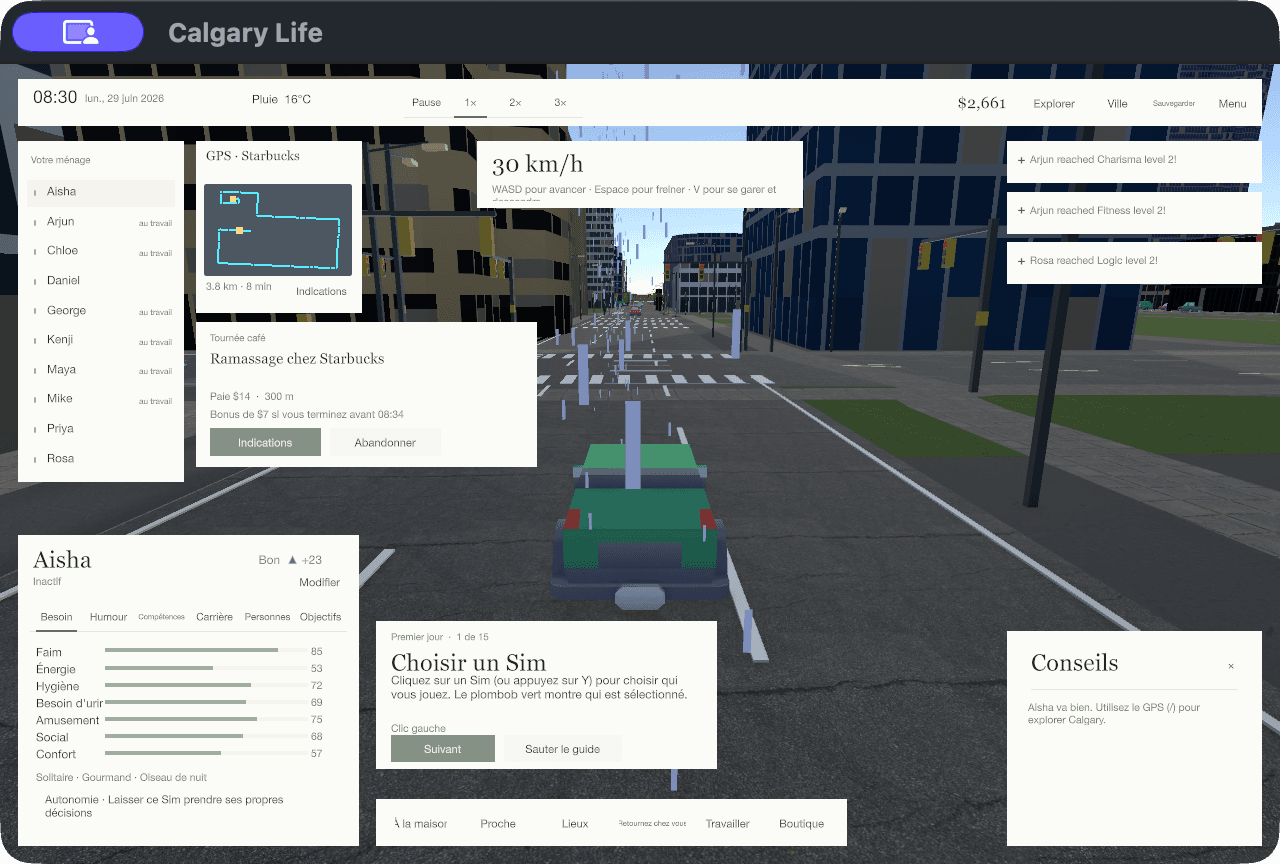
keyboard, mouse, and gamepad input pass through adapters into shared player intents. follow, free, first-person, and chase cameras then present the same world at different scales. the surrounding systems include ctrain service, weather, a day/night cycle, and the city budget.
05 — development notes
a playable build is part of the architecture.
windows, macos, and webgl share an editor build pipeline: stamp the version, prepare collision, audit lanes, copy the data to the player's expected location, then build and package. desktop browsers add their own constraints: loading is staged across frames, and save data needs to be flushed to indexeddb to persist between sessions.
saves are versioned and checked before loading, with data-folder migration and backup recovery. those details protect the time a player has invested in a household. english and french text, rebindable controls, text sizing, and controller menus also belong to the playable experience.
the repository has plain c# tests for life rules, routing, traffic, saves, and input intents, alongside unity play checks and smoke/soak tooling. keeping the cores outside unity makes rules easier to exercise; scene-level checks still have to catch camera, collision, animation, and interface problems.
the useful boundary
game rules can be tested without rendering the city. unity remains responsible for making those rules visible and controllable.
still in development
this is a desktop game and desktop browser build. touch controls and vr are not implemented. automated checks do not establish that every street or interaction is free of problems.
project notes & credits
architecture described from the game's implementation and system documentation. map data: © openstreetmap contributors (odbl); building heights: city of calgary open data; terrain: mapzen / aws terrain tiles. people: microsoft rocketbox (mit); animations: quaternius (cc0); cars: kenney (cc0).